Microsoft 365 security usually fails in quiet, ordinary ways.
A former employee still has access to a shared mailbox.
A vendor guest account from a completed project remains active 14 months later.
A Conditional Access policy sits in report-only mode because testing was never finished.
A Global Admin account is used for daily email and Teams.
A SharePoint folder has been shared so many times that inheritance is broken and no one can explain who currently has access.
A security alert fired three weeks ago and landed in an inbox no one monitors.
The tenant did not become insecure because Microsoft 365 is weak. It became insecure because the environment kept changing after initial setup, and no one owned the operating rhythm required to keep controls aligned with reality.
Microsoft 365 supplies strong tools. It does not supply an operating system. That part belongs to the business.
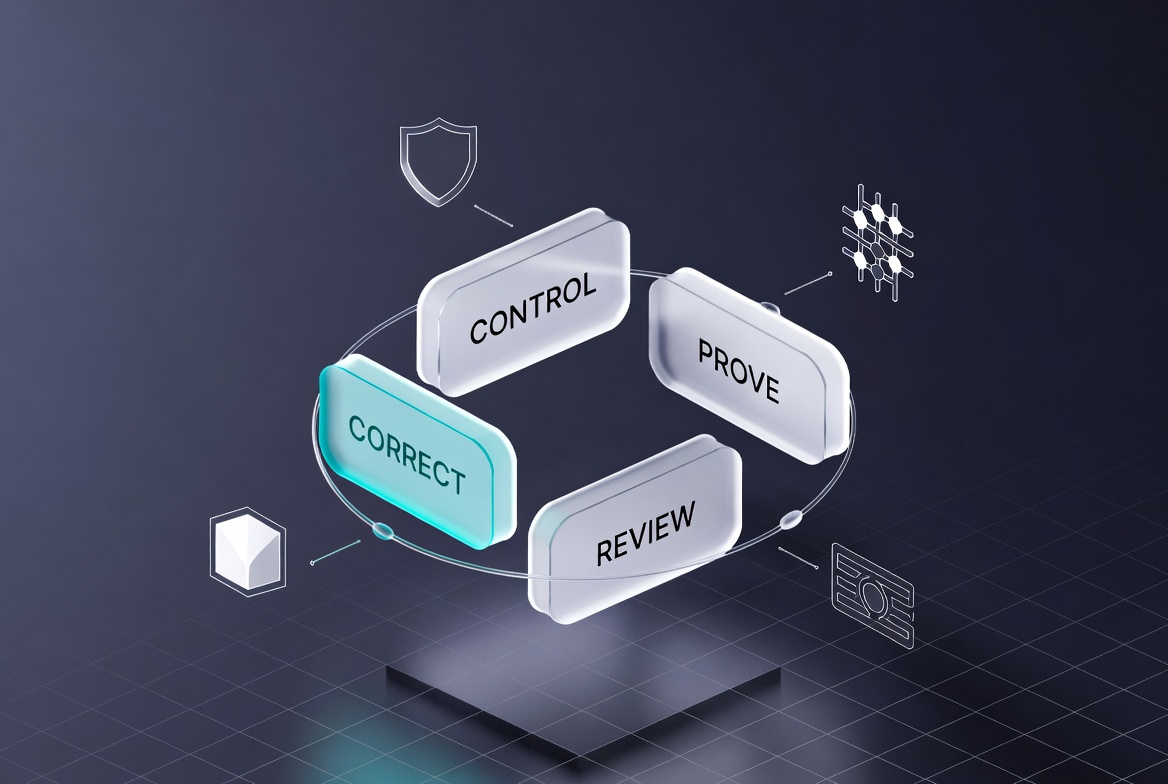
The Control, Prove, Review, Correct Operating System
Effective Microsoft 365 security management runs on four continuous actions:
Control: The right policies and restrictions are actually active and enforced.
Prove: Evidence exists that controls are working as intended, not merely configured.
Review: Someone checks for drift on a defined, recurring schedule.
Correct: Gaps are closed before they become incidents, audit findings, insurance problems, or data exposure.
These four actions form a closed loop. When any link weakens, risk compounds across identity, email, files, Teams, Copilot, devices, and vendor access.
That is why Microsoft 365 governance has to be treated as an operating discipline, not a one-time setup project.
Microsoft 365 Security Management Checklist
A useful review starts with evidence, not assumptions. Walk through this checklist to determine what is actually controlled.
| Area | What to Check | What Good Looks Like |
|---|---|---|
| MFA | Enforcement scope, exceptions, legacy auth, admin coverage | MFA enforced for all users via Conditional Access; exceptions documented and minimal; all admins and privileged roles covered; legacy authentication blocked |
| Conditional Access | Policy status, report-only mode, exclusions, covered apps | Relevant policies actively enforcing; no critical policies left in report-only; exclusions reviewed and justified |
| Admin Accounts | Global Admin count, daily-use admins, MFA, emergency access, role reviews | Minimum number of Global Admins; admin accounts separate from daily use; MFA enforced on privileged roles; emergency accounts protected and monitored; roles reviewed on schedule |
| Offboarding | Sign-in block, session revocation, groups, Teams, SharePoint, OneDrive, devices, licenses, ownership transfer | Complete documented checklist executed for every departure; no residual access paths remain |
| Guest Users & External Sharing | Current guests, approval chain, scope, expiration, “Anyone” links | Every guest has a documented business reason and expiration date; inactive guests removed; sensitive sites restrict external sharing |
| SharePoint & Teams Permissions | Site ownership, inheritance, broad groups, external links, inactive sites | Clear ownership for every site and Team; sensitive content has limited, auditable access; drift reviewed on schedule |
| Alerts | Routing, ownership, escalation, false-positive tuning, documentation | Alerts reach a named owner; high-severity items have defined escalation and response SLAs; recurring noise is actively reduced |
| Backup & Recovery | Native retention vs. third-party backup, restore testing, recovery objectives | Recovery strategy documented and tested; tested restore points exist for critical data; recovery time and scope understood |
| Secure Score | Recommendations vs. business context, accepted risks, exceptions | Score used as one input; business-specific risks tracked separately; accepted risks documented with owners and review dates |
| Copilot Readiness | Permissions, oversharing, sensitive data exposure, external access | Permissions cleaned and reviewed before Copilot rollout; sensitive sites and broad access addressed |
| Cyber Insurance Evidence | MFA proof, backup tests, admin controls, incident response, policy documentation | Evidence can be produced quickly for MFA enforcement, restore testing, privileged access reviews, and active policy status |
If a business cannot answer these questions with current evidence, it does not have security management.
It has features and hope.
MFA: Enforced vs. Assumed
MFA is foundational, but “we have MFA” is not a control statement.
Effective management requires knowing:
Is MFA enforced for every user through Conditional Access, or are some accounts still on per-user settings?
Are all admins and privileged roles covered without exception?
Are guest users and service accounts included or deliberately excluded?
Are legacy authentication paths blocked?
Are exceptions documented, time-bound, and reviewed on schedule?
One undocumented exception or one legacy auth path can undermine the entire control. The standard is simple: MFA must be enforced, exceptions must be known and minimal, and admin coverage must be verified.
MFA should sit inside a broader cybersecurity services strategy, not exist as a checkbox someone turned on once and forgot.
Conditional Access: Active Enforcement, Not Theater
Conditional Access is where Microsoft 365 security becomes precise. It is also where many organizations create false confidence.
A policy left in report-only mode logs what would have happened. It does not stop risky access. A business can believe it has strong controls while the system is only observing.
A proper review confirms which policies are actively enforcing, which remain in report-only and why, which users or apps are excluded and whether those exclusions are still justified, and whether risky sign-ins are actually being blocked.
A policy that only reports is not a control.
It is unfinished work.
Admin Accounts: The Control Plane Requires Different Rules
Admin accounts are not user accounts. A compromised Global Admin can alter the entire tenant.
The common failure pattern is an owner, executive, or internal contact using a Global Admin account for normal daily work. That account receives email, clicks links, and participates in normal workflows. If compromised, the attacker gains the control plane.
Effective management requires a minimum number of Global Admins, admin accounts kept separate from daily use, MFA enforced on every privileged role, emergency break-glass accounts created and protected, privileged roles reviewed on a defined schedule, and former admins removed after departure.
Admin risk is solved by structure and review, not by trust.
Offboarding: A Security Control, Not an HR Task
Blocking sign-in and removing the license is the minimum.
It is not complete.
A full offboarding process must also address active sessions, group memberships, Teams ownership, SharePoint permissions, OneDrive data ownership, shared mailboxes, mobile devices, and any guest relationships the departing user created.
Residual access often survives because offboarding relies on memory instead of a documented checklist. The risk is rarely dramatic on day one. It appears later when old credentials or session tokens are exploited.
Offboarding must be a repeatable security control with documented completion.
Guest Users and External Sharing: Temporary Access Must Expire
External collaboration is necessary.
Unmanaged external access is not.
Vendors, contractors, clients, and partners receive access for a project. When the project ends, the access frequently remains because no one owns the lifecycle.
Effective management requires every guest user to have a documented business reason, an approver, defined access scope, and an expiration date. “Anyone” links should be restricted, especially on sensitive sites. Inactive guests must be removed on a schedule.
Temporary access becomes permanent exposure when no one is responsible for ending it.
SharePoint and Teams: Drift Is the Default Without Ownership
Permission drift does not require malice or a single bad decision. It is the natural result of normal business activity over time.
New projects create Teams and SharePoint sites. People share folders. Vendors are added. Employees change roles. Inheritance gets broken for convenience. Broad groups get reused because they are faster.
After several years, no one can clearly explain who has access to what, especially on older project spaces.
Effective management requires scheduled ownership reviews, cleanup of inactive sites, restriction of broad groups on sensitive content, and a process to re-evaluate permissions when projects end or people change roles.
That is why common Microsoft 365 security gaps are hard to spot from the surface. The business keeps working while the access model gets weaker.
Secure Score, Alerts, Backup, and Copilot
Secure Score is a useful signal of configuration gaps. It is not proof of security. It can improve while business-specific risks remain unaddressed. Treat it as one input, not the scorecard.
Alerts only protect the business if a named owner receives them, understands priority, acts on high-severity items, and documents response. Alerts that land in ignored inboxes are storage, not security.
Backup and recovery assumptions are common. Native retention and version history are not the same as tested disaster recovery for ransomware, malicious deletion, or long-undetected data loss. A proper review confirms what can actually be restored, how far back, and how long recovery takes.
That is why backup and continuity planning belongs in the Microsoft 365 security conversation.
Copilot does not create new permissions. It surfaces what already exists. If sensitive files sit in broadly accessible locations because of old permissions or oversharing, Copilot makes that exposure easier to discover. Permission cleanup must precede Copilot deployment on any tenant with sensitive data.
That is why Copilot for business risks are often Microsoft 365 governance risks.
Cyber Insurance and Ohio Defensibility
Cyber insurance carriers increasingly require evidence of active controls, not just confirmation that controls exist. Businesses that cannot produce MFA enforcement records, restore test results, admin role reviews, or incident response documentation may face coverage gaps, higher premiums, or more difficult renewal conversations.
For Ohio businesses, documentation also creates a meaningful affirmative defense opportunity under the Ohio Data Protection Act. Organizations that implement and maintain a written cybersecurity program reasonably conforming to recognized frameworks can receive liability protections in certain data breach circumstances.
This is not legal advice, and it does not eliminate risk. But it reinforces the operational point.
Security controls need to be implemented, maintained, and documented.
Microsoft 365 is where client data, financial records, employee information, and operational files live for law firms, manufacturers, professional services companies, dealerships, healthcare offices, and logistics businesses.
Treating governance as optional is not just a technical risk.
It is a business defensibility risk.
What a 90-Day Microsoft 365 Security Review Must Produce
A useful review does not end with a slide deck.
It ends with clarity.
Within 90 days, a business should be able to produce:
Current list of active and inactive users with access paths documented
Admin and privileged role inventory with review status
MFA enforcement status and documented exceptions
Conditional Access policy status, including active vs. report-only
Guest user and external sharing findings with expiration status
SharePoint and Teams permission risks and ownership gaps
Offboarding process completeness
Secure Score review with business context and accepted risks
Alert routing, ownership, and escalation gaps
Backup and recovery assumptions vs. tested reality
Copilot permission risks, if relevant
Cyber insurance evidence gaps
Prioritized correction plan with owners and deadlines
The most valuable output is clear answers to four questions:
What is controlled?
What is exposed?
What is undocumented?
What must be corrected first?
That is the difference between Microsoft 365 security management and Microsoft 365 security theater.
Why Isolated Microsoft 365 Management Creates Blind Spots
Microsoft 365 touches identity, email, files, Teams, SharePoint, devices, vendors, help desk, backup, security monitoring, and daily operations.
A password reset can reveal an identity control gap.
A Teams permission issue can reveal drift.
A backup question can reveal recovery assumptions.
A Copilot discussion can reveal oversharing that existed for years.
When Microsoft 365 governance is treated as a disconnected cloud app instead of part of the full operating environment, these connections stay invisible until something forces visibility.
CTMS connects Microsoft 365 governance, cybersecurity services, managed IT services, backup and continuity planning, and help desk support so these issues are not treated as disconnected problems.
The practical starting point is building the operating rhythm of Control, Prove, Review, and Correct, then running it consistently.
Everything else is secondary.
If your Microsoft 365 environment has grown through years of users, vendors, Teams, SharePoint sites, permissions, licenses, and security settings, you can contact CTMS to start a practical review.
Written by Dan Stark, CTMS content strategist and SEO writer. Dan helps turn real-world IT, cybersecurity, Microsoft 365, and business technology issues into practical resources for Ohio businesses.
FAQ: Microsoft 365 Security Management
What is Microsoft 365 security management?
It is the ongoing operating system of Control, Prove, Review, and Correct applied to identity, access, permissions, admin accounts, external sharing, alerts, backup assumptions, and offboarding inside Microsoft 365. It requires active ownership over time, not one-time configuration.
Is Microsoft 365 secure by default?
Microsoft 365 includes strong native security capabilities, but the tenant changes constantly through normal business activity. Without continuous governance, controls drift from the intended state.
Is MFA enough?
MFA is essential but insufficient by itself. Enforcement scope, exceptions, legacy authentication, admin coverage, and Conditional Access integration must all be verified and maintained.
What is the difference between Security Defaults and Conditional Access?
Security Defaults provide baseline protection. Conditional Access provides precise, risk-based control over who can access what, from where, on what device, and under what conditions. Most growing businesses need Conditional Access for adequate protection.
Does Microsoft back up my data?
Microsoft provides infrastructure availability and native retention. Businesses remain responsible for their own backup and recovery strategy under the shared responsibility model. Retention and version history are not tested disaster recovery.
What should happen when an employee leaves?
A complete offboarding process must block sign-in, revoke sessions, remove group and Teams access, review and transfer SharePoint and OneDrive ownership, handle mailbox and shared mailbox access, remove devices, and document completion. Blocking the account alone leaves residual exposure.
Can Copilot expose sensitive information?
Copilot uses existing permissions. If users already have access to sensitive files through old permissions, oversharing, or broad groups, Copilot can make that information easier to discover. Permission cleanup should precede Copilot deployment on any tenant with sensitive data.
What evidence do cyber insurers typically want for Microsoft 365?
Common requirements include proof of MFA enforcement, endpoint protection, backup testing, admin access controls, incident response planning, and evidence that policies are active rather than just configured.